Version du Document: 3.0
Dernière Mise à Jour: 24 Mars 2026
Vue d'Ensemble
Ce document fournit les spécifications techniques pour intégrer les systèmes de vente avec IzyScan Server. IzyScan est un système d'affichage des prix et de gestion des stocks qui nécessite une synchronisation avec les systèmes POS/vente existants.
🖥️ Démarrage du Serveur Web API
Cette section vous montre comment créer et démarrer un serveur web simple sur le port 80 dans différents langages de programmation.
Création d'un Serveur Web Basique
PHP - Serveur Intégré
// server.php
<?php
// Route principale
if ($_SERVER['REQUEST_URI'] == '/') {
    header('Content-Type: application/json');
    echo json_encode(['status' => 'success', 'message' => 'Serveur en marche']);
    exit;
}

// Autres routes retournent 404
http_response_code(404);
echo json_encode(['status' => 'error', 'message' => 'Route non trouvée']);

// Pour démarrer le serveur sur le port 80:
// sudo php -S 0.0.0.0:80 server.php
?>
Node.js - Serveur HTTP
// server.js
const http = require('http');

const server = http.createServer((req, res) => {
    res.setHeader('Content-Type', 'application/json');

    if (req.url === '/' && req.method === 'GET') {
        res.statusCode = 200;
        res.end(JSON.stringify({
            status: 'success',
            message: 'Serveur en marche'
        }));
    } else {
        res.statusCode = 404;
        res.end(JSON.stringify({
            status: 'error',
            message: 'Route non trouvée'
        }));
    }
});

const PORT = 80;
server.listen(PORT, () => {
    console.log(`Serveur démarré sur http://localhost:${PORT}`);
});

// Pour démarrer: sudo node server.js
C# - Serveur HTTP Simple
// Program.cs
using System;
using System.Net;
using System.Text;
using System.Text.Json;

class Program
{
    static void Main()
    {
        HttpListener listener = new HttpListener();
        listener.Prefixes.Add("http://*:80/");
        listener.Start();

        Console.WriteLine("Serveur démarré sur http://localhost:80");

        while (true)
        {
            HttpListenerContext context = listener.GetContext();
            HttpListenerResponse response = context.Response;

            response.ContentType = "application/json";

            string responseString;
            if (context.Request.Url.AbsolutePath == "/")
            {
                responseString = JsonSerializer.Serialize(new {
                    status = "success",
                    message = "Serveur en marche"
                });
                response.StatusCode = 200;
            }
            else
            {
                responseString = JsonSerializer.Serialize(new {
                    status = "error",
                    message = "Route non trouvée"
                });
                response.StatusCode = 404;
            }

            byte[] buffer = Encoding.UTF8.GetBytes(responseString);
            response.ContentLength64 = buffer.Length;
            response.OutputStream.Write(buffer, 0, buffer.Length);
            response.Close();
        }
    }
}

// Pour compiler et démarrer:
// dotnet run (en tant qu'administrateur)
Java - Serveur HTTP
// SimpleServer.java
import com.sun.net.httpserver.*;
import java.io.*;
import java.net.InetSocketAddress;

public class SimpleServer {
    public static void main(String[] args) throws IOException {
        HttpServer server = HttpServer.create(new InetSocketAddress(80), 0);

        server.createContext("/", exchange -> {
            String response;
            int statusCode;

            if (exchange.getRequestURI().getPath().equals("/")) {
                response = "{\"status\":\"success\",\"message\":\"Serveur en marche\"}";
                statusCode = 200;
            } else {
                response = "{\"status\":\"error\",\"message\":\"Route non trouvée\"}";
                statusCode = 404;
            }

            exchange.getResponseHeaders().set("Content-Type", "application/json");
            exchange.sendResponseHeaders(statusCode, response.length());

            OutputStream os = exchange.getResponseBody();
            os.write(response.getBytes());
            os.close();
        });

        server.start();
        System.out.println("Serveur démarré sur http://localhost:80");
    }
}

// Pour compiler et démarrer:
// javac SimpleServer.java
// sudo java SimpleServer
Python - Serveur HTTP
# server.py
from http.server import HTTPServer, BaseHTTPRequestHandler
import json

class SimpleHandler(BaseHTTPRequestHandler):
    def do_GET(self):
        self.send_response(200 if self.path == '/' else 404)
        self.send_header('Content-Type', 'application/json')
        self.end_headers()

        if self.path == '/':
            response = {
                'status': 'success',
                'message': 'Serveur en marche'
            }
        else:
            response = {
                'status': 'error',
                'message': 'Route non trouvée'
            }

        self.wfile.write(json.dumps(response).encode())

if __name__ == '__main__':
    server = HTTPServer(('', 80), SimpleHandler)
    print('Serveur démarré sur http://localhost:80')
    server.serve_forever()

# Pour démarrer: sudo python server.py
Delphi - Serveur HTTP avec Indy
program SimpleWebServer;

{$APPTYPE CONSOLE}

uses
  System.SysUtils,
  IdHTTPServer,
  IdContext,
  IdCustomHTTPServer;

type
  TSimpleServer = class
    procedure HandleRequest(AContext: TIdContext;
      ARequestInfo: TIdHTTPRequestInfo;
      AResponseInfo: TIdHTTPResponseInfo);
  end;

procedure TSimpleServer.HandleRequest(AContext: TIdContext;
  ARequestInfo: TIdHTTPRequestInfo; AResponseInfo: TIdHTTPResponseInfo);
begin
  AResponseInfo.ContentType := 'application/json';

  if ARequestInfo.Document = '/' then
  begin
    AResponseInfo.ResponseNo := 200;
    AResponseInfo.ContentText := '{"status":"success","message":"Serveur en marche"}';
  end
  else
  begin
    AResponseInfo.ResponseNo := 404;
    AResponseInfo.ContentText := '{"status":"error","message":"Route non trouvée"}';
  end;
end;

var
  Server: TIdHTTPServer;
  Handler: TSimpleServer;
begin
  Server := TIdHTTPServer.Create(nil);
  Handler := TSimpleServer.Create;
  try
    Server.DefaultPort := 80;
    Server.OnCommandGet := Handler.HandleRequest;
    Server.Active := True;

    WriteLn('Serveur démarré sur http://localhost:80');
    WriteLn('Appuyez sur Entrée pour arrêter...');
    ReadLn;
  finally
    Server.Free;
    Handler.Free;
  end;
end.
WinDev - Serveur Web Simple
// Procédure principale
PROCEDURE DémarrerServeur()
    // Créer un serveur web sur le port 80
    MonServeur est un httpServeur
    MonServeur..Port = 80
    MonServeur..RacineDocumentaire = fRepExe()

    // Ajouter une route pour "/"
    MonServeur..AjouteRoute("/", ProcédureAccueil)

    // Démarrer le serveur
    SI MonServeur..Démarre() ALORS
        Info("Serveur démarré sur http://localhost:80")
    SINON
        Erreur("Impossible de démarrer le serveur")
    FIN
FIN

// Procédure pour gérer la route principale
PROCEDURE ProcédureAccueil(Requête est un httpRequête, Réponse est un httpRéponse)
    Réponse..TypeContenu = "application/json"
    Réponse..CodeStatut = 200

    vRéponse est un Variant
    vRéponse.status = "success"
    vRéponse.message = "Serveur en marche"

    Réponse..Contenu = VariantVersJSON(vRéponse)
FIN

// Appel de la procédure
DémarrerServeur()- Le port 80 nécessite généralement des privilèges administrateur/root
- Sur Linux/Mac, utilisez
sudopour démarrer le serveur - Sur Windows, exécutez en tant qu'administrateur
- Pour tester: ouvrez votre navigateur sur
http://localhost/
🔐 Authentification
IzyScan supporte trois méthodes d'authentification (configurables par installation):
1. Sans Authentification
Si les champs login et mot de passe sont vides, les requêtes sont envoyées sans en-têtes d'authentification.
2. Authentification par Token
Si seul le champ mot de passe est configuré, il est traité comme un token d'accès:
Authorization: Bearer votre_token_acces_ici3. Authentification Basique
Si le login et le mot de passe sont fournis:
Authorization: Basic base64(nom_utilisateur:mot_de_passe)🏓 Point de Terminaison Ping (Health Check)
Objectif: Tester la connectivité avec le serveur
Vérification de Santé
Ce point de terminaison permet à IzyScan de vérifier que le serveur est accessible et répond correctement.
Réponse:
| Statut | Description |
|---|---|
| 200 OK | Le corps de la réponse peut être n'importe quoi (non analysé par le client) |
📝 Exemples de Code
// PHP - GET /api/ping
public function ping() {
    return response()->json([
        'status' => 'ok',
        'message' => 'pong'
    ], 200);
}

// Dans routes/api.php
Route::get('/api/ping', 'ApiController@ping');
// Node.js - GET /api/ping
app.get('/api/ping', (req, res) => {
res.status(200).json({
status: 'ok',
message: 'pong'
});
});// C# - GET /api/ping
[HttpGet("ping")]
public IActionResult Ping()
{
return Ok(new
{
status = "ok",
message = "pong"
});
}// Java - GET /api/ping
@GetMapping("/api/ping")
public ResponseEntity ping() {
return ResponseEntity.ok(Map.of(
"status", "ok",
"message", "pong"
));
}# Python - GET /api/ping
@app.route('/api/ping', methods=['GET'])
def ping():
return jsonify({
'status': 'ok',
'message': 'pong'
}), 200// Delphi - GET /api/ping
procedure TSimpleServer.HandlePing(AContext: TIdContext;
ARequestInfo: TIdHTTPRequestInfo; AResponseInfo: TIdHTTPResponseInfo);
begin
AResponseInfo.ContentType := 'application/json';
AResponseInfo.ResponseNo := 200;
AResponseInfo.ContentText := '{"status":"ok","message":"pong"}';
end;// WinDev - GET /api/ping
PROCEDURE ProcédurePing(Requête est un httpRequête, Réponse est un httpRéponse)
Réponse..TypeContenu = "application/json"
Réponse..CodeStatut = 200
vRéponse est un Variant
vRéponse.status = "ok"
vRéponse.message = "pong"
Réponse..Contenu = VariantVersJSON(vRéponse)
FIN📦 Points de Terminaison Produits
Tous les points de terminaison doivent accepter du contenu JSON et retourner des réponses JSON.
Content-Type: application/json et Accept: application/json
Synchronisation des Produits
Objectif: Récupérer les produits pour la synchronisation avec IzyScan
Paramètres de Requête:
| Paramètre | Type | Obligatoire | Description |
|---|---|---|---|
updated_since |
string (ISO 8601) | Optionnel | Pour la synchronisation incrémentale (ex: 2024-01-15 10:30:00). Retourne uniquement les produits créés ou modifiés après cette date. |
limit |
integer | Optionnel | Nombre maximum de produits par requête (le client demande 2000) |
offset |
integer | Optionnel | Nombre de produits à ignorer (pour la pagination, défaut: 0) |
Exemple de Requête:
GET /api/products?updated_since=2024-01-15 10:30:00&limit=2000&offset=0Réponse:
{
  "data": [
    {
      "id": 123,
      "name": "Nom du Produit",
      "barcode": "1234567890123",
      "price": 29.99,
      "promo_price": 25.99,
      "server_id": 123
    }
  ],
  "pagination": {
    "total": 15000,
    "offset": 0,
    "limit": 2000,
    "has_more": true
  }
}
Champs de l'objet Produit:
| Champ | Type | Obligatoire | Description |
|---|---|---|---|
id |
string/number | Obligatoire | Identifiant unique du produit (peut être identique au barcode) |
name |
string | Obligatoire | Nom d'affichage du produit |
barcode |
string | Obligatoire | Code-barres du produit (EAN-13, UPC, etc.). Les produits sans code-barres sont ignorés. |
price |
number | Obligatoire | Prix de vente actuel |
promo_price |
number | Optionnel | Prix promotionnel (si applicable) |
server_id |
string/number | Optionnel | ID du produit côté serveur (utilisé pour les mises à jour de prix) |
Champs de l'objet Pagination:
| Champ | Type | Obligatoire | Description |
|---|---|---|---|
total |
integer | Recommandé | Nombre total de produits correspondant à la requête |
offset |
integer | Recommandé | Décalage actuel |
limit |
integer | Recommandé | Limite demandée |
has_more |
boolean | Recommandé | true si plus de produits disponibles, false sinon |
- Si la pagination n'est pas fournie, le client utilise la détection de taille de lot
- Les produits avec un code-barres vide ou manquant sont ignorés par le client
- Le client récupère par lots de 2000 jusqu'à ce que
has_moresoitfalse
📝 Exemples de Code
// PHP - GET /api/products
public function getProducts(Request $request) {
    $updatedSince = $request->query('updated_since');
    $limit = min($request->query('limit', 2000), 2000);
    $offset = $request->query('offset', 0);

    $query = Product::where('barcode', '!=', null)
                    ->where('barcode', '!=', '');

    if ($updatedSince) {
        $query->where('updated_at', '>=', $updatedSince);
    }

    $total = $query->count();
    $products = $query->offset($offset)->limit($limit)->get();

    return response()->json([
        'data' => $products->map(function($product) {
            return [
                'id' => $product->id,
                'name' => $product->name,
                'barcode' => $product->barcode,
                'price' => (float) $product->price,
                'promo_price' => $product->promo_price ? (float) $product->promo_price : null,
                'server_id' => $product->id,
            ];
        }),
        'pagination' => [
            'total' => $total,
            'offset' => $offset,
            'limit' => $limit,
            'has_more' => ($offset + $limit) < $total,
        ]
    ]);
}
// Node.js - GET /api/products
app.get('/api/products', async (req, res) => {
const { updated_since, limit = 2000, offset = 0 } = req.query;
let query = db.products.find({
barcode: { $ne: null, $ne: '' }
});
if (updated_since) {
query = query.where('updated_at').gte(new Date(updated_since));
}
const total = await db.products.countDocuments({
barcode: { $ne: null, $ne: '' }
});
const products = await query
.skip(parseInt(offset))
.limit(Math.min(parseInt(limit), 2000))
.exec();
res.json({
data: products.map(product => ({
id: product._id,
name: product.name,
barcode: product.barcode,
price: parseFloat(product.price),
promo_price: product.promo_price ? parseFloat(product.promo_price) : null,
server_id: product._id,
})),
pagination: {
total,
offset: parseInt(offset),
limit: parseInt(limit),
has_more: (parseInt(offset) + parseInt(limit)) < total,
}
});
});// C# - GET /api/products
[HttpGet("products")]
public async Task GetProducts(
[FromQuery] DateTime? updatedSince,
[FromQuery] int limit = 2000,
[FromQuery] int offset = 0)
{
limit = Math.Min(limit, 2000);
var query = _context.Products
.Where(p => p.Barcode != null && p.Barcode != "");
if (updatedSince.HasValue)
{
query = query.Where(p => p.UpdatedAt >= updatedSince.Value);
}
var total = await query.CountAsync();
var products = await query
.Skip(offset)
.Take(limit)
.Select(p => new
{
id = p.Id,
name = p.Name,
barcode = p.Barcode,
price = p.Price,
promo_price = (decimal?)p.PromoPrice,
server_id = p.Id
})
.ToListAsync();
return Ok(new
{
data = products,
pagination = new
{
total,
offset,
limit,
has_more = (offset + limit) < total
}
});
} // Java - GET /api/products
@GetMapping("/api/products")
public ResponseEntity getProducts(
@RequestParam(required = false) String updatedSince,
@RequestParam(defaultValue = "2000") int limit,
@RequestParam(defaultValue = "0") int offset) {
limit = Math.min(limit, 2000);
Specification spec = (root, query, cb) ->
cb.and(
cb.isNotNull(root.get("barcode")),
cb.notEqual(root.get("barcode"), "")
);
if (updatedSince != null) {
LocalDateTime date = LocalDateTime.parse(updatedSince);
spec = spec.and((root, query, cb) ->
cb.greaterThanOrEqualTo(root.get("updatedAt"), date));
}
long total = productRepository.count(spec);
Pageable pageable = PageRequest.of(offset / limit, limit);
Page page = productRepository.findAll(spec, pageable);
List> products = page.getContent().stream()
.map(p -> Map.of(
"id", p.getId(),
"name", p.getName(),
"barcode", p.getBarcode(),
"price", p.getPrice(),
"promo_price", p.getPromoPrice(),
"server_id", p.getId()
))
.collect(Collectors.toList());
return ResponseEntity.ok(Map.of(
"data", products,
"pagination", Map.of(
"total", total,
"offset", offset,
"limit", limit,
"has_more", offset + limit < total
)
));
} # Python - GET /api/products
from flask import Flask, request, jsonify
from datetime import datetime
@app.route('/api/products', methods=['GET'])
def get_products():
updated_since = request.args.get('updated_since')
limit = min(int(request.args.get('limit', 2000)), 2000)
offset = int(request.args.get('offset', 0))
query = Product.query.filter(
Product.barcode.isnot(None),
Product.barcode != ''
)
if updated_since:
date = datetime.fromisoformat(updated_since.replace('Z', '+00:00'))
query = query.filter(Product.updated_at >= date)
total = query.count()
products = query.offset(offset).limit(limit).all()
return jsonify({
'data': [{
'id': p.id,
'name': p.name,
'barcode': p.barcode,
'price': float(p.price),
'promo_price': float(p.promo_price) if p.promo_price else None,
'server_id': p.id
} for p in products],
'pagination': {
'total': total,
'offset': offset,
'limit': limit,
'has_more': (offset + limit) < total
}
})// Delphi - GET /api/products
procedure GetProducts(const UpdatedSince: string; Limit, Offset: Integer);
var
HttpClient: TNetHTTPClient;
Response: IHTTPResponse;
URL: string;
JSONResponse: TJSONObject;
Products: TJSONArray;
begin
HttpClient := TNetHTTPClient.Create(nil);
try
URL := Format('https://api.example.com/api/products?limit=%d&offset=%d',
[Limit, Offset]);
if UpdatedSince <> '' then
URL := URL + '&updated_since=' + UpdatedSince;
HttpClient.Accept := 'application/json';
Response := HttpClient.Get(URL);
if Response.StatusCode = 200 then
begin
JSONResponse := TJSONObject.ParseJSONValue(Response.ContentAsString) as TJSONObject;
try
if JSONResponse.GetValue('status').Value = 'success' then
begin
Products := JSONResponse.GetValue('data');
// Traiter les produits...
end;
finally
JSONResponse.Free;
end;
end;
finally
HttpClient.Free;
end;
end; // WinDev - GET /api/products
PROCEDURE RécupérerProduits(dtDepuisMiseAJour est un DateHeure = "", nLimite est un entier = 2000, nOffset est un entier = 0)
tabProduits est un tableau de STProduct
sURL = gsURLAPI + "/api/products?"
sURL += "limit=" + nLimite
sURL += "&offset=" + nOffset
SI dtDepuisMiseAJour <> "" ALORS
sURL += "&updated_since=" + DateHeureVersISO8601(dtDepuisMiseAJour)
FIN
requeteHTTP est un httpRequête
requeteHTTP.URL = sURL
requeteHTTP.Méthode = httpGet
tabEntetes est un tableau associatif de chaînes = ObtenirEntetes()
POUR TOUT sValeur, sCle DE tabEntetes
requeteHTTP.Entête[sCle] = sValeur
FIN
réponseHTTP est un httpRéponse = HTTPEnvoie(requeteHTTP)
SI réponseHTTP.CodeEtat = 200 ALORS
vJSON est un Variant = JSONVersVariant(réponseHTTP.Contenu)
POUR TOUT vProduit DE vJSON.data
stProduit est un STProduct
stProduit.id = vProduit.id
stProduit.name = vProduit.name
stProduit.barcode = vProduit.barcode
stProduit.price = vProduit.price
stProduit.promo_price = vProduit.promo_price
stProduit.server_id = vProduit.server_id
Ajoute(tabProduits, stProduit)
FIN
FIN
RENVOYER tabProduits
FINMise à Jour du Prix
Objectif: Mettre à jour le prix d'un produit depuis IzyScan
Paramètres d'URL:
barcode: Code-barres du produit
Corps de la Requête:
{
  "barcode": "1234567890123",
  "price": 32.99,
  "server_id": 123
}
Réponse:
{
  "status": "success",
  "message": "Prix mis à jour avec succès",
  "data": {
    "server_id": 123,
    "barcode": "1234567890123",
    "old_price": 29.99,
    "new_price": 32.99,
    "updated_at": "2025-07-16T15:30:00Z"
  }
}
📝 Exemples de Code
// PHP - PUT ou POST /api/products/{barcode}/price
public function updatePrice(Request $request, $barcode) {
    $validated = $request->validate([
        'price' => 'required|numeric|min:0',
        'server_id' => 'required|integer'
    ]);

    $product = Product::where('barcode', $barcode)->first();

    if (!$product) {
        return response()->json([
            'status' => 'error',
            'error_code' => 'PRODUCT_NOT_FOUND',
            'message' => 'Produit non trouvé'
        ], 404);
    }

    $oldPrice = $product->price;
    $product->price = $validated['price'];
    $product->save();

    return response()->json([
        'status' => 'success',
        'message' => 'Prix mis à jour avec succès',
        'data' => [
            'server_id' => $product->id,
            'barcode' => $product->barcode,
            'old_price' => (float) $oldPrice,
            'new_price' => (float) $product->price,
            'updated_at' => $product->updated_at->toISOString(),
        ]
    ]);
}

// Dans routes/api.php
Route::match(['PUT', 'POST'], '/api/products/{barcode}/price', 'ProductController@updatePrice');
// Node.js - PUT ou POST /api/products/:barcode/price
app.put('/api/products/:barcode/price', updatePrice);
app.post('/api/products/:barcode/price', updatePrice);
async function updatePrice(req, res) {
const { barcode } = req.params;
const { price, server_id } = req.body;
if (!price || price < 0) {
return res.status(400).json({
status: 'error',
error_code: 'INVALID_PRICE',
message: 'Le prix doit être un nombre positif'
});
}
const product = await db.products.findOne({ barcode });
if (!product) {
return res.status(404).json({
status: 'error',
error_code: 'PRODUCT_NOT_FOUND',
message: 'Produit non trouvé'
});
}
const oldPrice = product.price;
product.price = price;
product.updated_at = new Date();
await product.save();
res.json({
status: 'success',
message: 'Prix mis à jour avec succès',
data: {
server_id: product._id,
barcode: product.barcode,
old_price: parseFloat(oldPrice),
new_price: parseFloat(price),
updated_at: product.updated_at.toISOString(),
}
});
}// C# - PUT ou POST /api/products/{barcode}/price
[HttpPut("products/{barcode}/price")]
[HttpPost("products/{barcode}/price")]
public async Task UpdatePrice(
string barcode,
[FromBody] PriceUpdateRequest request)
{
if (request.Price < 0)
{
return BadRequest(new ErrorResponse
{
ErrorCode = "INVALID_PRICE",
Message = "Le prix doit être un nombre positif"
});
}
var product = await _context.Products
.FirstOrDefaultAsync(p => p.Barcode == barcode);
if (product == null)
{
return NotFound(new ErrorResponse
{
ErrorCode = "PRODUCT_NOT_FOUND",
Message = "Produit non trouvé"
});
}
var oldPrice = product.Price;
product.Price = request.Price;
product.UpdatedAt = DateTime.UtcNow;
await _context.SaveChangesAsync();
return Ok(new
{
status = "success",
message = "Prix mis à jour avec succès",
data = new
{
server_id = product.Id,
barcode = product.Barcode,
old_price = oldPrice,
new_price = product.Price,
updated_at = product.UpdatedAt.ToString("yyyy-MM-dd'T'HH:mm:ss'Z'")
}
});
} // Java - PUT ou POST /api/products/{barcode}/price
@PutMapping("/api/products/{barcode}/price")
@PostMapping("/api/products/{barcode}/price")
public ResponseEntity updatePrice(
@PathVariable String barcode,
@RequestBody PriceUpdateRequest request) {
if (request.getPrice().compareTo(BigDecimal.ZERO) < 0) {
return ResponseEntity.badRequest().body(Map.of(
"status", "error",
"error_code", "INVALID_PRICE",
"message", "Le prix doit être un nombre positif"
));
}
Optional productOpt = productRepository.findByBarcode(barcode);
if (productOpt.isEmpty()) {
return ResponseEntity.status(404).body(Map.of(
"status", "error",
"error_code", "PRODUCT_NOT_FOUND",
"message", "Produit non trouvé"
));
}
Product product = productOpt.get();
BigDecimal oldPrice = product.getPrice();
product.setPrice(request.getPrice());
product.setUpdatedAt(LocalDateTime.now());
productRepository.save(product);
return ResponseEntity.ok(Map.of(
"status", "success",
"message", "Prix mis à jour avec succès",
"data", Map.of(
"server_id", product.getId(),
"barcode", product.getBarcode(),
"old_price", oldPrice,
"new_price", product.getPrice(),
"updated_at", product.getUpdatedAt().toString()
)
));
} # Python - PUT ou POST /api/products/{barcode}/price
@app.route('/api/products//price', methods=['PUT', 'POST'])
def update_price(barcode):
data = request.get_json()
if 'price' not in data or data['price'] < 0:
return jsonify({
'status': 'error',
'error_code': 'INVALID_PRICE',
'message': 'Le prix doit être un nombre positif'
}), 400
product = Product.query.filter_by(barcode=barcode).first()
if not product:
return jsonify({
'status': 'error',
'error_code': 'PRODUCT_NOT_FOUND',
'message': 'Produit non trouvé'
}), 404
old_price = product.price
product.price = data['price']
product.updated_at = datetime.utcnow()
db.session.commit()
return jsonify({
'status': 'success',
'message': 'Prix mis à jour avec succès',
'data': {
'server_id': product.id,
'barcode': product.barcode,
'old_price': float(old_price),
'new_price': float(product.price),
'updated_at': product.updated_at.isoformat() + 'Z'
}
}) // Delphi - PUT ou POST /api/products/{barcode}/price
procedure UpdatePrice(const Barcode: string; NewPrice: Currency; ServerID: Integer);
var
HttpClient: TNetHTTPClient;
Response: IHTTPResponse;
RequestBody: TJSONObject;
ResponseJSON: TJSONObject;
begin
HttpClient := TNetHTTPClient.Create(nil);
try
RequestBody := TJSONObject.Create;
try
RequestBody.AddPair('barcode', Barcode);
RequestBody.AddPair('price', TJSONNumber.Create(NewPrice));
RequestBody.AddPair('server_id', TJSONNumber.Create(ServerID));
HttpClient.ContentType := 'application/json';
HttpClient.Accept := 'application/json';
Response := HttpClient.Put(
Format('https://api.example.com/api/products/%s/price', [Barcode]),
TStringStream.Create(RequestBody.ToString, TEncoding.UTF8)
);
if Response.StatusCode = 200 then
begin
ResponseJSON := TJSONObject.ParseJSONValue(Response.ContentAsString) as TJSONObject;
try
ShowMessage('Prix mis à jour avec succès');
finally
ResponseJSON.Free;
end;
end;
finally
RequestBody.Free;
end;
finally
HttpClient.Free;
end;
end;// WinDev - PUT ou POST /api/products/{barcode}/price
PROCEDURE MettreAJourPrix(sBarcode est une chaîne, mNouveauPrix est un monétaire, nServerID est un entier) : booléen
vRequete est un Variant
vRequete.barcode = sBarcode
vRequete.price = mNouveauPrix
vRequete.server_id = nServerID
sJSONRequete = VariantVersJSON(vRequete)
requeteHTTP est un httpRequête
requeteHTTP.URL = gsURLAPI + "/api/products/" + sBarcode + "/price"
requeteHTTP.Méthode = httpPut // ou httpPost
requeteHTTP.Contenu = sJSONRequete
tabEntetes est un tableau associatif de chaînes = ObtenirEntetes()
POUR TOUT sValeur, sCle DE tabEntetes
requeteHTTP.Entête[sCle] = sValeur
FIN
réponseHTTP est un httpRéponse = HTTPEnvoie(requeteHTTP)
SI réponseHTTP.CodeEtat = 200 ALORS
vRéponse est un Variant = JSONVersVariant(réponseHTTP.Contenu)
SI vRéponse.status = "success" ALORS
Info("Prix mis à jour", "Ancien: " + vRéponse.data.old_price, "Nouveau: " + vRéponse.data.new_price)
RENVOYER Vrai
FIN
FIN
RENVOYER Faux
FIN⚡ Push API — Mise à Jour des Prix en Temps Réel
Ce point de terminaison permet aux systèmes de vente (POS) d'envoyer directement les modifications de prix au serveur IzyScan, garantissant que les afficheurs de prix reflètent immédiatement les changements sans attendre la synchronisation périodique.
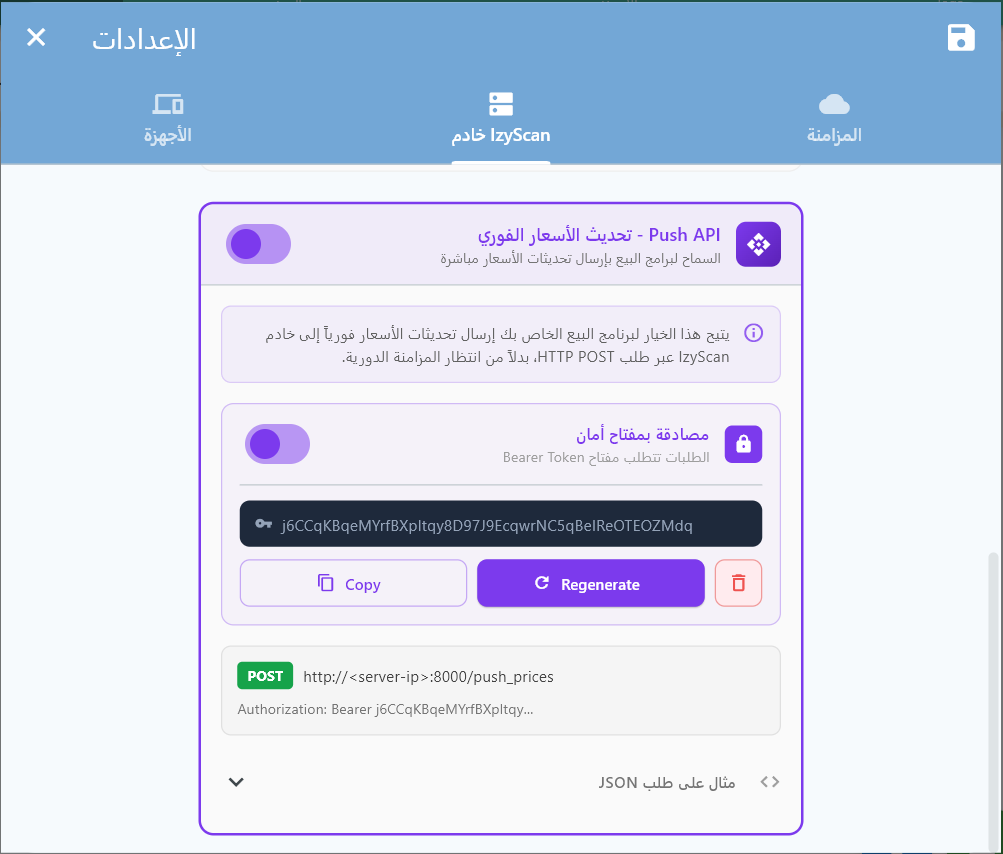
Envoyer des Mises à Jour de Prix
Objectif: Pousser un ou plusieurs changements de prix vers IzyScan pour une mise à jour instantanée sur les afficheurs
En-têtes:
| En-tête | Valeur | Requis |
|---|---|---|
Content-Type |
application/json |
Oui |
Authorization |
Bearer <votre_token> |
Uniquement si un token est configuré |
Corps de la Requête — Un seul produit:
{
  "barcode": "6281001210016",
  "name": "Nom du produit",
  "price": 12.500,
  "promo_price": 9.900
}
Corps de la Requête — Plusieurs produits:
{
  "products": [
    {
      "barcode": "6281001210016",
      "name": "Lait Entier 1L",
      "price": 12.500,
      "promo_price": 9.900
    },
    {
      "barcode": "5449000000996",
      "name": "Coca-Cola 330ml",
      "price": 3.250,
      "promo_price": 0
    }
  ]
}
Champs du Produit:
| Champ | Type | Requis | Description |
|---|---|---|---|
barcode |
string | Oui | Code-barres unique du produit (EAN-13, UPC, etc.) |
name |
string | Oui* | Nom du produit. *Requis uniquement si le produit n'existe pas encore dans IzyScan |
price |
number | Oui | Prix de vente actuel (≥ 0) |
promo_price |
number | Non | Prix promotionnel. Si 0 ou égal au price → pas de promotion |
Réponse — Tous les produits traités avec succès (200):
{
  "status": "success",
  "total": 1500,
  "updated": 1350,
  "created": 150,
  "failed": 0
}
Réponse — Avec des erreurs partielles (200):
Le traitement ne s'arrête jamais à la première erreur. Tous les produits valides sont enregistrés, et seuls les codes-barres en erreur sont listés dans failed_items.
{
  "status": "success",
  "total": 1500,
  "updated": 1347,
  "created": 148,
  "failed": 5,
  "failed_items": [
    { "barcode": "999000111", "reason": "MISSING_NAME" },
    { "barcode": "888000222", "reason": "INVALID_PRICE" },
    { "barcode": "?", "reason": "MISSING_BARCODE" }
  ]
}
Codes d'erreur par produit (reason):
| Code | Description |
|---|---|
MISSING_BARCODE | Le champ barcode est absent ou vide |
MISSING_PRICE | Le champ price est absent |
INVALID_PRICE | Le prix n'est pas un nombre valide ou est négatif |
MISSING_NAME | Le nom est requis pour un nouveau produit (inexistant dans IzyScan) |
INVALID_ITEM | L'élément n'est pas un objet JSON valide |
WRITE_ERROR | Erreur d'écriture dans la base de données locale |
Réponses d'Erreur HTTP:
| Code HTTP | Erreur | Description |
|---|---|---|
| 401 | UNAUTHORIZED |
Token d'authentification invalide ou manquant |
| 405 | METHOD_NOT_ALLOWED |
Seule la méthode POST est acceptée |
| 400 | INVALID_JSON |
Le corps de la requête n'est pas du JSON valide |
| 400 | EMPTY_BODY |
Le corps de la requête est vide |
| 400 | BATCH_TOO_LARGE |
Plus de 5 000 produits envoyés — paginez vos requêtes |
| 503 | PUSH_API_DISABLED |
Le Push API n'est pas activé dans les paramètres |
📝 Exemples d'Intégration
// PHP — Envoyer une modification de prix à IzyScan
function pushPriceUpdate($izyscanHost, $port, $token, $products) {
    $url = "http://{$izyscanHost}:{$port}/push_prices";

    $headers = ['Content-Type: application/json'];
    if (!empty($token)) {
        $headers[] = "Authorization: Bearer {$token}";
    }

    $data = json_encode(['products' => $products]);

    $ch = curl_init($url);
    curl_setopt($ch, CURLOPT_POST, true);
    curl_setopt($ch, CURLOPT_POSTFIELDS, $data);
    curl_setopt($ch, CURLOPT_HTTPHEADER, $headers);
    curl_setopt($ch, CURLOPT_RETURNTRANSFER, true);
    curl_setopt($ch, CURLOPT_TIMEOUT, 10);

    $response = curl_exec($ch);
    $httpCode = curl_getinfo($ch, CURLINFO_HTTP_CODE);
    curl_close($ch);

    return ['status' => $httpCode, 'body' => json_decode($response, true)];
}

// Utilisation — lors d'un changement de prix dans votre logiciel
$result = pushPriceUpdate('192.168.1.100', 8000, 'votre_token', [
    [
        'barcode'     => '6281001210016',
        'name'        => 'Lait Entier 1L',
        'price'       => 12.500,
        'promo_price' => 9.900,
    ],
]);
// Node.js — Envoyer une modification de prix à IzyScan
async function pushPriceUpdate(izyscanHost, port, token, products) {
const url = `http://${izyscanHost}:${port}/push_prices`;
const headers = { 'Content-Type': 'application/json' };
if (token) {
headers['Authorization'] = `Bearer ${token}`;
}
const response = await fetch(url, {
method: 'POST',
headers,
body: JSON.stringify({ products }),
});
return await response.json();
}
// Utilisation — Appeler cette fonction à chaque modification de prix
const result = await pushPriceUpdate('192.168.1.100', 8000, 'votre_token', [
{
barcode: '6281001210016',
name: 'Lait Entier 1L',
price: 12.500,
promo_price: 9.900,
},
]);
console.log(`Résultat: ${result.summary.updated} mis à jour, ${result.summary.created} créés`);// C# — Envoyer une modification de prix à IzyScan
public async Task<string> PushPriceUpdate(
string izyscanHost, int port, string token, object[] products)
{
using var client = new HttpClient();
client.Timeout = TimeSpan.FromSeconds(10);
if (!string.IsNullOrEmpty(token))
client.DefaultRequestHeaders.Authorization =
new System.Net.Http.Headers.AuthenticationHeaderValue("Bearer", token);
var payload = new { products };
var json = System.Text.Json.JsonSerializer.Serialize(payload);
var content = new StringContent(json, Encoding.UTF8, "application/json");
var response = await client.PostAsync(
$"http://{izyscanHost}:{port}/push_prices", content);
return await response.Content.ReadAsStringAsync();
}
// Utilisation — dans votre gestionnaire d'événement de changement de prix
var result = await PushPriceUpdate("192.168.1.100", 8000, "votre_token",
new object[] {
new { barcode = "6281001210016", name = "Lait Entier 1L",
price = 12.500, promo_price = 9.900 }
});// Java — Envoyer une modification de prix à IzyScan
import java.net.http.*;
import java.net.URI;
public String pushPriceUpdate(
String host, int port, String token, String jsonProducts)
throws Exception {
HttpClient client = HttpClient.newBuilder()
.connectTimeout(Duration.ofSeconds(10))
.build();
HttpRequest.Builder builder = HttpRequest.newBuilder()
.uri(URI.create("http://" + host + ":" + port + "/push_prices"))
.header("Content-Type", "application/json")
.POST(HttpRequest.BodyPublishers.ofString(jsonProducts));
if (token != null && !token.isEmpty()) {
builder.header("Authorization", "Bearer " + token);
}
HttpResponse<String> response =
client.send(builder.build(), HttpResponse.BodyHandlers.ofString());
return response.body();
}
// Utilisation
String json = "{\"products\":[{\"barcode\":\"6281001210016\","
+ "\"name\":\"Lait Entier 1L\",\"price\":12.5,\"promo_price\":9.9}]}";
String result = pushPriceUpdate("192.168.1.100", 8000, "votre_token", json);# Python — Envoyer une modification de prix à IzyScan
import requests
def push_price_update(izyscan_host, port, token, products):
url = f"http://{izyscan_host}:{port}/push_prices"
headers = {"Content-Type": "application/json"}
if token:
headers["Authorization"] = f"Bearer {token}"
response = requests.post(
url,
json={"products": products},
headers=headers,
timeout=10,
)
response.raise_for_status()
return response.json()
# Utilisation — à appeler à chaque changement de prix dans votre système
result = push_price_update("192.168.1.100", 8000, "votre_token", [
{
"barcode": "6281001210016",
"name": "Lait Entier 1L",
"price": 12.500,
"promo_price": 9.900,
},
])
print(f"Mis à jour: {result['summary']['updated']}, Créés: {result['summary']['created']}")// Delphi — Envoyer une modification de prix à IzyScan
uses System.Net.HttpClient, System.JSON;
function PushPriceUpdate(const AIzyScanHost: string; APort: Integer;
const AToken: string; AProducts: TJSONArray): TJSONObject;
var
LClient: THTTPClient;
LResponse: IHTTPResponse;
LPayload: TJSONObject;
LContent: TStringStream;
begin
LClient := THTTPClient.Create;
try
LClient.ConnectionTimeout := 10000;
LClient.ContentType := 'application/json';
if AToken <> '' then
LClient.CustomHeaders['Authorization'] := 'Bearer ' + AToken;
LPayload := TJSONObject.Create;
LPayload.AddPair('products', AProducts);
LContent := TStringStream.Create(LPayload.ToJSON, TEncoding.UTF8);
try
LResponse := LClient.Post(
Format('http://%s:%d/push_prices', [AIzyScanHost, APort]),
LContent);
Result := TJSONObject.ParseJSONValue(
LResponse.ContentAsString) as TJSONObject;
finally
LContent.Free;
LPayload.Free;
end;
finally
LClient.Free;
end;
end;
// Utilisation
var Products := TJSONArray.Create;
var Product := TJSONObject.Create;
Product.AddPair('barcode', '6281001210016');
Product.AddPair('name', 'Lait Entier 1L');
Product.AddPair('price', TJSONNumber.Create(12.500));
Product.AddPair('promo_price', TJSONNumber.Create(9.900));
Products.Add(Product);
var Result := PushPriceUpdate('192.168.1.100', 8000, 'votre_token', Products);// WinDev — Envoyer une modification de prix à IzyScan
PROCÉDURE PushPriceUpdate(sHôte est une chaîne,
nPort est un entier, sToken est une chaîne,
tabProduits est un tableau de STProductPush)
sURL est une chaîne = ChaîneConstruit(
"http://%1:%2/push_prices", sHôte, nPort)
// Construire le JSON
vPayload est un Variant
vPayload.products = tabProduits
sJSON est une chaîne = VariantVersJSON(vPayload)
// Préparer la requête
cRequête est un httpRequête
cRequête.URL = sURL
cRequête.Méthode = httpPost
cRequête.ContentType = "application/json"
cRequête.Contenu = sJSON
cRequête.Timeout = 10s
SI sToken <> "" ALORS
cRequête.Entête["Authorization"] = "Bearer " + sToken
FIN
// Envoyer
cRéponse est un httpRéponse = HTTPEnvoie(cRequête)
SI cRéponse.CodeEtat = 200 ALORS
Info("Prix mis à jour avec succès")
SINON
Erreur("Échec: " + cRéponse.Contenu)
FIN
FIN
// Utilisation — appeler lors de la modification d'un prix
stProduit est un STProductPush
stProduit.barcode = "6281001210016"
stProduit.name = "Lait Entier 1L"
stProduit.price = 12.500
stProduit.promo_price = 9.900
tabProduits est un tableau de STProductPush
Ajoute(tabProduits, stProduit)
PushPriceUpdate("192.168.1.100", 8000, "votre_token", tabProduits)📘 Bonnes Pratiques d'Intégration
1. Mise à jour en temps réel (cas principal)
Appelez ce endpoint immédiatement après chaque modification de prix dans votre logiciel de vente. C'est l'usage principal du Push API — garantir que les afficheurs reflètent le bon prix en quelques secondes.
2. Synchronisation complète (full sync) — Pagination obligatoire
Ce endpoint peut aussi servir de synchronisation complète pour envoyer l'intégralité de votre catalogue. Le serveur impose une limite de 5 000 produits par requête. Au-delà, vous recevez l'erreur BATCH_TOO_LARGE.
Pour un catalogue de 50 000 produits, découpez en lots :
// Pseudo-code — Synchronisation complète paginée

BATCH_SIZE = 5000
allProducts = getAllProductsFromPOS()
totalBatches = ceil(allProducts.length / BATCH_SIZE)

// Envoyer chaque lot séquentiellement
for i = 0 to totalBatches - 1:
    batch = allProducts[i * BATCH_SIZE .. (i+1) * BATCH_SIZE]

    response = HTTP_POST("/push_prices", { "products": batch })

    if response.status == "success":
        print("Lot " + (i+1) + "/" + totalBatches +
              " — " + response.updated + " mis à jour, " +
              response.created + " créés")
    else:
        print("Erreur lot " + (i+1) + ": " + response.error)
        // Retry ce lot ou continuer selon votre logique

    // Pause optionnelle entre les lots (100-500ms)
sleep(200ms)| Taille catalogue | Lots (à 5 000/lot) | Temps estimé |
|---|---|---|
| 5 000 produits | 1 requête | ~2s |
| 20 000 produits | 4 requêtes | ~10s |
| 100 000 produits | 20 requêtes | ~45s |
3. Règles générales
- Retry en cas d'échec réseau — Le serveur IzyScan peut être temporairement injoignable. Réessayez 2-3 fois avec un délai croissant (1s, 3s, 5s).
- Token en configuration — Stockez le token dans la configuration de votre logiciel, jamais en dur dans le code source.
- Promo automatique — Si
promo_priceest0ou ≥price, la promotion est automatiquement désactivée. - Nom facultatif pour les mises à jour — Le champ
namen'est obligatoire que pour les nouveaux produits. Pour une mise à jour de prix,barcode+pricesuffisent. - Pas de doublons nécessaires — Si vous envoyez le même barcode deux fois dans un lot, le dernier prix l'emporte.
📋 Points de Terminaison Inventaires
Ces points de terminaison gèrent la création et la gestion des inventaires depuis IzyScan.
Création d'Inventaire
Objectif: Recevoir les données d'inventaire depuis IzyScan
Corps de la Requête:
{
  "name": "Nom de l'Inventaire",
  "date_created": "2024-01-15T10:30:00.000Z",
  "date_started": "2024-01-15T10:35:00.000Z",
  "date_finished": "2024-01-15T12:00:00.000Z",
  "lines": [
    {
      "barcode": "1234567890123",
      "quantity": 15.5,
      "scanned_at": "2024-01-15T10:40:00.000Z"
    }
  ]
}
Champs de l'objet Inventaire:
| Champ | Type | Obligatoire | Description |
|---|---|---|---|
name |
string | Obligatoire | Nom de la session d'inventaire |
date_created |
string (ISO 8601) | Obligatoire | Date et heure de création de l'inventaire |
date_started |
string (ISO 8601) | Optionnel | Date et heure de début du scan |
date_finished |
string (ISO 8601) | Optionnel | Date et heure de fin de l'inventaire |
lines |
array | Obligatoire | Tableau des lignes d'inventaire |
Champs de l'objet Ligne d'Inventaire:
| Champ | Type | Obligatoire | Description |
|---|---|---|---|
barcode |
string | Obligatoire | Code-barres du produit |
quantity |
number | Obligatoire | Quantité scannée |
scanned_at |
string (ISO 8601) | Obligatoire | Date et heure du scan de l'article |
Réponse:
{
  "status": "success",
  "message": "Inventaire créé avec succès",
  "data": {
    "inventory_id": 456,
    "lines_processed": 25,
    "total_quantity": 150.75
  }
}
Statut HTTP: 201 Created
📝 Exemples de Code
// PHP - POST /api/inventories
public function createInventory(Request $request) {
    $validated = $request->validate([
        'name' => 'required|string|max:100',
        'date_created' => 'required|date',
        'date_started' => 'nullable|date',
        'date_finished' => 'nullable|date',
        'lines' => 'required|array',
        'lines.*.barcode' => 'required|string',
        'lines.*.quantity' => 'required|numeric|min:0',
        'lines.*.scanned_at' => 'required|date'
    ]);

    DB::beginTransaction();

    try {
        $inventory = Inventory::create([
            'name' => $validated['name'],
            'date_created' => $validated['date_created'],
            'date_started' => $validated['date_started'] ?? null,
            'date_finished' => $validated['date_finished'] ?? null
        ]);

        $totalQuantity = 0;
        foreach ($validated['lines'] as $line) {
            InventoryLine::create([
                'inventory_id' => $inventory->id,
                'barcode' => $line['barcode'],
                'quantity' => $line['quantity'],
                'scanned_at' => $line['scanned_at']
            ]);
            $totalQuantity += $line['quantity'];
        }

        DB::commit();

        return response()->json([
            'status' => 'success',
            'message' => 'Inventaire créé avec succès',
            'data' => [
                'inventory_id' => $inventory->id,
                'lines_processed' => count($validated['lines']),
                'total_quantity' => $totalQuantity
            ]
        ], 201);

    } catch (\Exception $e) {
        DB::rollBack();
        return response()->json([
            'error' => 'INTERNAL_ERROR',
            'message' => 'Erreur lors de la création de l\'inventaire'
        ], 500);
    }
}
// Node.js - POST /api/inventories
app.post('/api/inventories', async (req, res) => {
const { name, date_created, date_started, date_finished, lines } = req.body;
// Validation
if (!name || !date_created || !lines || !Array.isArray(lines)) {
return res.status(400).json({
error: 'VALIDATION_ERROR',
message: 'Données requises manquantes'
});
}
const session = await mongoose.startSession();
session.startTransaction();
try {
const inventory = new Inventory({
name,
date_created: new Date(date_created),
date_started: date_started ? new Date(date_started) : null,
date_finished: date_finished ? new Date(date_finished) : null
});
await inventory.save({ session });
let totalQuantity = 0;
const inventoryLines = [];
for (const line of lines) {
const inventoryLine = new InventoryLine({
inventory_id: inventory._id,
barcode: line.barcode,
quantity: line.quantity,
scanned_at: new Date(line.scanned_at)
});
inventoryLines.push(inventoryLine);
totalQuantity += line.quantity;
}
await InventoryLine.insertMany(inventoryLines, { session });
await session.commitTransaction();
res.status(201).json({
status: 'success',
message: 'Inventaire créé avec succès',
data: {
inventory_id: inventory._id,
lines_processed: lines.length,
total_quantity: totalQuantity
}
});
} catch (error) {
await session.abortTransaction();
res.status(500).json({
error: 'INTERNAL_ERROR',
message: 'Erreur lors de la création de l\'inventaire'
});
} finally {
session.endSession();
}
});// C# - POST /api/inventories
[HttpPost("inventories")]
public async Task CreateInventory([FromBody] InventoryRequest request)
{
if (!ModelState.IsValid)
{
return BadRequest(new { error = "VALIDATION_ERROR", message = "Données invalides" });
}
using var transaction = await _context.Database.BeginTransactionAsync();
try
{
var inventory = new Inventory
{
Name = request.Name,
DateCreated = request.DateCreated,
DateStarted = request.DateStarted,
DateFinished = request.DateFinished
};
_context.Inventories.Add(inventory);
await _context.SaveChangesAsync();
var inventoryLines = request.Lines.Select(line => new InventoryLine
{
InventoryId = inventory.Id,
Barcode = line.Barcode,
Quantity = line.Quantity,
ScannedAt = line.ScannedAt
}).ToList();
_context.InventoryLines.AddRange(inventoryLines);
await _context.SaveChangesAsync();
await transaction.CommitAsync();
var totalQuantity = request.Lines.Sum(l => l.Quantity);
return StatusCode(201, new
{
status = "success",
message = "Inventaire créé avec succès",
data = new
{
inventory_id = inventory.Id,
lines_processed = request.Lines.Count,
total_quantity = totalQuantity
}
});
}
catch (Exception)
{
await transaction.RollbackAsync();
return StatusCode(500, new { error = "INTERNAL_ERROR", message = "Erreur lors de la création de l'inventaire" });
}
} // Java - POST /api/inventories
@PostMapping("/api/inventories")
@Transactional
public ResponseEntity createInventory(@RequestBody @Valid InventoryRequest request) {
try {
Inventory inventory = new Inventory();
inventory.setName(request.getName());
inventory.setDateCreated(request.getDateCreated());
inventory.setDateStarted(request.getDateStarted());
inventory.setDateFinished(request.getDateFinished());
inventory = inventoryRepository.save(inventory);
List lines = new ArrayList<>();
BigDecimal totalQuantity = BigDecimal.ZERO;
for (InventoryLineRequest lineRequest : request.getLines()) {
InventoryLine line = new InventoryLine();
line.setInventory(inventory);
line.setBarcode(lineRequest.getBarcode());
line.setQuantity(lineRequest.getQuantity());
line.setScannedAt(lineRequest.getScannedAt());
lines.add(line);
totalQuantity = totalQuantity.add(lineRequest.getQuantity());
}
inventoryLineRepository.saveAll(lines);
return ResponseEntity.status(201).body(Map.of(
"status", "success",
"message", "Inventaire créé avec succès",
"data", Map.of(
"inventory_id", inventory.getId(),
"lines_processed", lines.size(),
"total_quantity", totalQuantity
)
));
} catch (Exception e) {
return ResponseEntity.status(500).body(Map.of(
"error", "INTERNAL_ERROR",
"message", "Erreur lors de la création de l'inventaire"
));
}
} # Python - POST /api/inventories
@app.route('/api/inventories', methods=['POST'])
def create_inventory():
data = request.get_json()
# Validation
required_fields = ['name', 'date_created', 'lines']
for field in required_fields:
if field not in data:
return jsonify({
'error': 'VALIDATION_ERROR',
'message': f'Champ requis manquant: {field}'
}), 400
try:
inventory = Inventory(
name=data['name'],
date_created=datetime.fromisoformat(data['date_created'].replace('Z', '+00:00')),
date_started=datetime.fromisoformat(data['date_started'].replace('Z', '+00:00')) if data.get('date_started') else None,
date_finished=datetime.fromisoformat(data['date_finished'].replace('Z', '+00:00')) if data.get('date_finished') else None
)
db.session.add(inventory)
db.session.flush() # Pour obtenir l'ID
total_quantity = 0
for line_data in data['lines']:
line = InventoryLine(
inventory_id=inventory.id,
barcode=line_data['barcode'],
quantity=line_data['quantity'],
scanned_at=datetime.fromisoformat(line_data['scanned_at'].replace('Z', '+00:00'))
)
db.session.add(line)
total_quantity += line_data['quantity']
db.session.commit()
return jsonify({
'status': 'success',
'message': 'Inventaire créé avec succès',
'data': {
'inventory_id': inventory.id,
'lines_processed': len(data['lines']),
'total_quantity': total_quantity
}
}), 201
except Exception as e:
db.session.rollback()
return jsonify({
'error': 'INTERNAL_ERROR',
'message': 'Erreur lors de la création de l\'inventaire'
}), 500// Delphi - POST /api/inventories
procedure CreateInventory(const InventoryData: TInventoryRequest);
var
HttpClient: TNetHTTPClient;
Response: IHTTPResponse;
RequestJSON, LineJSON: TJSONObject;
LinesArray: TJSONArray;
Line: TInventoryLine;
ResponseJSON: TJSONObject;
begin
HttpClient := TNetHTTPClient.Create(nil);
try
RequestJSON := TJSONObject.Create;
try
RequestJSON.AddPair('name', InventoryData.Name);
RequestJSON.AddPair('date_created', DateTimeToISO8601(InventoryData.DateCreated));
if InventoryData.DateStarted > 0 then
RequestJSON.AddPair('date_started', DateTimeToISO8601(InventoryData.DateStarted));
if InventoryData.DateFinished > 0 then
RequestJSON.AddPair('date_finished', DateTimeToISO8601(InventoryData.DateFinished));
LinesArray := TJSONArray.Create;
for Line in InventoryData.Lines do
begin
LineJSON := TJSONObject.Create;
LineJSON.AddPair('barcode', Line.Barcode);
LineJSON.AddPair('quantity', TJSONNumber.Create(Line.Quantity));
LineJSON.AddPair('scanned_at', DateTimeToISO8601(Line.ScannedAt));
LinesArray.AddElement(LineJSON);
end;
RequestJSON.AddPair('lines', LinesArray);
HttpClient.ContentType := 'application/json';
HttpClient.Accept := 'application/json';
Response := HttpClient.Post(
'https://api.example.com/api/inventories',
TStringStream.Create(RequestJSON.ToString, TEncoding.UTF8)
);
if Response.StatusCode = 201 then
begin
ResponseJSON := TJSONObject.ParseJSONValue(Response.ContentAsString) as TJSONObject;
try
if ResponseJSON.GetValue('status').Value = 'success' then
ShowMessage('Inventaire créé avec succès');
finally
ResponseJSON.Free;
end;
end;
finally
RequestJSON.Free;
end;
finally
HttpClient.Free;
end;
end;// WinDev - POST /api/inventories
PROCEDURE CréerInventaire(sNom est une chaîne, dtDateCreated est un DateHeure, dtDateStarted est un DateHeure = "", dtDateFinished est un DateHeure = "", tabLignes est un tableau de STInventoryLine) : entier
vInventaire est un Variant
vInventaire.name = sNom
vInventaire.date_created = DateHeureVersISO8601(dtDateCreated)
SI dtDateStarted <> "" ALORS
vInventaire.date_started = DateHeureVersISO8601(dtDateStarted)
FIN
SI dtDateFinished <> "" ALORS
vInventaire.date_finished = DateHeureVersISO8601(dtDateFinished)
FIN
Dimension(vInventaire.lines, 0)
POUR TOUT stLigne DE tabLignes
vLigne est un Variant
vLigne.barcode = stLigne.barcode
vLigne.quantity = stLigne.quantity
vLigne.scanned_at = stLigne.scanned_at
Ajoute(vInventaire.lines, vLigne)
FIN
sJSONRequete = VariantVersJSON(vInventaire)
requeteHTTP est un httpRequête
requeteHTTP.URL = gsURLAPI + "/api/inventories"
requeteHTTP.Méthode = httpPost
requeteHTTP.Contenu = sJSONRequete
tabEntetes est un tableau associatif de chaînes = ObtenirEntetes()
POUR TOUT sValeur, sCle DE tabEntetes
requeteHTTP.Entête[sCle] = sValeur
FIN
réponseHTTP est un httpRéponse = HTTPEnvoie(requeteHTTP)
SI réponseHTTP.CodeEtat = 201 ALORS
vRéponse est un Variant = JSONVersVariant(réponseHTTP.Contenu)
SI vRéponse.status = "success" ALORS
Info("Inventaire créé", "ID: " + vRéponse.data.inventory_id)
RENVOYER vRéponse.data.inventory_id
FIN
FIN
RENVOYER 0
FIN📊 Modèles de Données
Modèle Produit
| Champ | Type | Obligatoire | Description |
|---|---|---|---|
id |
string/number | Obligatoire | Identifiant unique du produit (peut être identique au barcode) |
name |
string | Obligatoire | Nom d'affichage du produit |
barcode |
string | Obligatoire | Code-barres du produit (EAN-13, UPC, etc.). Les produits sans code-barres sont ignorés. |
price |
number | Obligatoire | Prix de vente actuel |
promo_price |
number | Optionnel | Prix promotionnel (si applicable) |
server_id |
string/number | Optionnel | ID du produit côté serveur (utilisé pour les mises à jour de prix) |
Modèle Inventaire
| Champ | Type | Obligatoire | Description |
|---|---|---|---|
name |
string | Obligatoire | Nom de la session d'inventaire |
date_created |
string (ISO 8601) | Obligatoire | Date et heure de création de l'inventaire |
date_started |
string (ISO 8601) | Optionnel | Date et heure de début du scan |
date_finished |
string (ISO 8601) | Optionnel | Date et heure de fin de l'inventaire |
lines |
array | Obligatoire | Tableau des lignes d'inventaire |
Modèle Ligne d'Inventaire
| Champ | Type | Obligatoire | Description |
|---|---|---|---|
barcode |
string | Obligatoire | Code-barres du produit |
quantity |
number | Obligatoire | Quantité scannée |
scanned_at |
string (ISO 8601) | Obligatoire | Date et heure du scan de l'article |
⚠️ Gestion des Erreurs
Format de Réponse d'Erreur Standard (Recommandé)
{
  "error": "CODE_ERREUR",
  "message": "Message d'erreur lisible"
}
Codes de Statut HTTP
| Code | Description |
|---|---|
| 200 OK | Requêtes GET/PUT réussies |
| 201 Created | Requêtes POST réussies |
| 400 Bad Request | Données de requête invalides |
| 401 Unauthorized | Authentification requise ou échouée |
| 404 Not Found | Ressource non trouvée |
| 422 Unprocessable Entity | Erreurs de validation |
| 500 Internal Server Error | Erreur serveur |
Codes d'Erreur Courants
INVALID_CREDENTIALS- Authentification échouéePRODUCT_NOT_FOUND- Produit avec le code-barres donné non trouvéINVALID_BARCODE- Format du code-barres invalideINVALID_PRICE- Valeur du prix invalideDUPLICATE_BARCODE- Le code-barres existe déjàVALIDATION_ERROR- Validation des données échouéeINTERNAL_ERROR- Erreur interne du serveur
🔄 Flux d'Implémentation
Cette section décrit les flux typiques d'utilisation de l'API par le client IzyScan.
1. Synchronisation Complète Initiale
- Le client appelle
GET /api/pingpour vérifier la connectivité - Le client appelle
GET /api/products?limit=2000&offset=0 - Le client continue à récupérer avec un offset croissant jusqu'à ce que
has_moresoitfalse - Le client stocke le timestamp de la dernière synchronisation localement
2. Synchronisation Incrémentale
- Le client appelle
GET /api/products?updated_since=2024-01-15 10:30:00&limit=2000&offset=0 - Seuls les produits modifiés après la date donnée sont retournés
- Le client met à jour sa base de données locale avec les changements
3. Envoi d'Inventaire
- L'utilisateur termine une session d'inventaire sur l'appareil mobile
- Le client appelle
POST /api/inventoriesavec les données complètes de l'inventaire - Le serveur traite et stocke l'inventaire
4. Mise à Jour de Prix
- L'utilisateur modifie le prix sur l'appareil mobile
- Le client appelle
PUT /api/products/{barcode}/price - Le serveur met à jour le prix du produit dans le système backend
- Le code-barres est la clé: Le client utilise le code-barres comme identifiant principal pour les produits localement
- Synchronisation Incrémentale: Implémenter le filtre
updated_sinceaméliore significativement les performances de synchronisation pour les grands catalogues - Pagination Requise: Pour les catalogues de plus de 2000 produits, la pagination est essentielle
- Encodage UTF-8: Tous les champs texte doivent être encodés en UTF-8
- Fuseau Horaire: Toutes les valeurs datetime doivent être au format ISO 8601 (UTC recommandé)
✨ Meilleures Pratiques
1. 🚀 Optimisation des Performances
- Pagination: Toujours implémenter la pagination pour les listes de produits
- Indexation: Créer des index de base de données sur les champs
barcode,updated_at
2. 🔄 Cohérence des Données
- Validation: Valider toutes les données d'entrée avant traitement
- Transactions: Utiliser des transactions de base de données pour les opérations critiques
- Contraintes Uniques: Assurer l'unicité des codes-barres dans votre base de données
- Précision Décimale: Utiliser une précision décimale appropriée pour les prix
3. 🔐 Sécurité
- Authentification: Implémenter des mécanismes d'authentification robustes
- Sanitisation des Entrées: Sanitiser toutes les données d'entrée
- Journalisation: Journaliser tous les accès API à des fins d'audit
4. 🧪 Tests
Liste de Vérification des Tests
- Le point de terminaison de vérification de santé répond correctement
- Synchronisation des produits avec divers filtres
- Fonctionnalité de mise à jour des prix
- Création d'inventaire avec plusieurs lignes
- Mécanismes d'authentification
- Gestion des erreurs pour les requêtes invalides
- Fonctionnalité de pagination
- Performance sous charge
Données de Test Échantillon
{
  "test_product": {
    "id": 999,
    "name": "Produit Test",
    "barcode": "9999999999999",
    "price": 10.99,
    "promo_price": 8.99,
    "server_id": 999
  },
  "test_inventory": {
    "name": "Inventaire Test",
    "date_created": "2024-01-15T10:30:00.000Z",
    "date_started": "2024-01-15T10:35:00.000Z",
    "date_finished": "2024-01-15T12:00:00.000Z",
    "lines": [
      {
        "barcode": "9999999999999",
        "quantity": 5.0,
        "scanned_at": "2024-01-15T10:40:00.000Z"
      }
    ]
  }
}
📞 Support
Pour le support technique et les questions concernant cette intégration:
- Support d'Implémentation: Contactez l'équipe technique IzyScan
- Email: m.benyoub@massani3.com
- Téléphone: 00213560389077